Kasvia

Plant Care Made Easy

Kasvia keeps track of your plants so you don't have to. Care reminders, growth history, and everything your plants need, all in one place.

Free to download. No account needed.

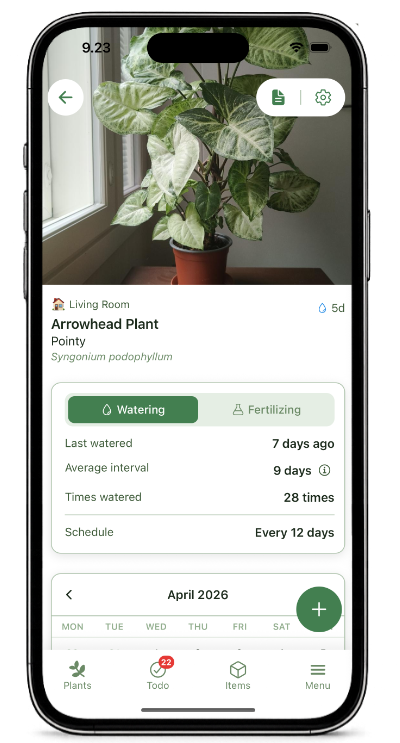
Kasvia plant detail screen showing a plant photo, watering schedule, and care history.
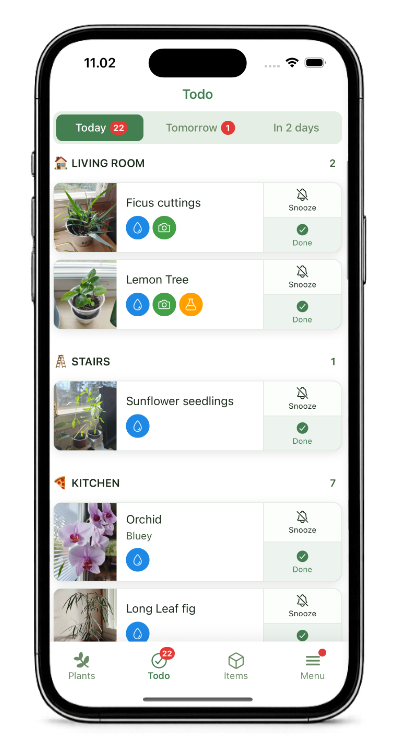
Kasvia Todo screen showing due watering tasks grouped by day.

Happy plants, without the worry

Set your schedules, get reminders, and see what needs care each day.
That's all it takes.

Kasvia Todo screen showing plants due today and upcoming care tasks.

See what needs attention today

Set a watering or fertilizing schedule for each plant, based on what it actually needs. Kasvia collects everything due today, tomorrow, and the day after in one clear list. Work through it, mark things done — and you'll know every plant is taken care of.

Avoid overwatering your plants

When a reminder arrives and the plant does not look ready yet, snooze it for a day or two. You will get another nudge, so you can wait with confidence instead of watering just in case.

Your plant's story, easy to follow

Open any plant to see its care history, photos, notes, and schedules together in a timeline that grows with it.

Kasvia plant detail screen showing care history, photos, notes, and schedules.

Start with the full picture

Every plant has its own space for the details that matter: what you did, what changed, what is coming up next, and what you want to remember later. Instead of scattered notes and separate reminders, the context stays with the plant.

Kasvia plant timeline showing two monstera update photos with five days between them.

Watch it grow

Every photo you take is added to a timeline with the time elapsed between each one. Scroll back through months of growth and see exactly how fast — or slow — things change. You start to understand your plant's rhythm without having to think about it.

Kasvia update event showing multiple photos for a repotting.
Kasvia Plus

Before and after

Repotted it. Pruned it. Gave it a new pot. Some moments deserve more than one photo. Attach up to four images to a single update and capture the full transformation — the before, the during, and the after.

Track your gear

Fertilizers, tools, grow lights, seeds — everything that supports your plants deserves a place too.

Kasvia Items tab showing plant care supplies organised by category.

Know what you have

Add your plant care supplies and check them wherever you are. When you spot a deal at the garden centre or find seeds on sale, a quick check tells you if you already have them at home. No more duplicate purchases. No more coming home to find you already had it.

Kasvia item detail screen showing purchase date, warranty information, linked plant history, and documents.

Keep the details with the item

Open an item to see the details you need later: purchase date, warranty information, linked plant history, and any documents attached to it. Receipts, manuals, care labels, and notes stay connected to the thing they belong to.

🧾

Never lose a receipt again

Attach a receipt photo when you add an item. If something breaks while it's still under warranty, the proof of purchase is right there — no digging through drawers, no searching old emails.

Finding just one receipt you'd otherwise have lost can easily save you real money.

Your data stays on your device and never leaves it without you knowing, so saving receipts here is as private as keeping them in a drawer.

💡

Instructions, always at hand

Photograph the fertilizer dosage before you throw away the bag. Save the key page from a service manual. Keep the care label from a grow light. Whatever instructions you know you'll need later and know you'll struggle to find — they live here now, one tap away. The more you put in, the more useful it gets.

Know your plants

Every plant has a place. And the ones that have come and gone deserve to be remembered.

Kasvia plant list grouped by location.

Organised by space

Assign plants to rooms, shelves, balconies, or wherever they live. When it's time to care, you move room by room — watering everything in one spot before moving to the next. Simple and efficient.

🌱

Plant archive

Plants leave. Their story doesn't.

When a plant is no longer with you, archiving feels better than deleting. Its photos, care history, and notes stay exactly as they were. Scroll through it like old photos on your phone — and occasionally find something useful, like how a past plant recovered from the same problem your current one is showing now.

Jussi

The person behind Kasvia

Hi, I'm Jussi, the developer of Kasvia. I live in Jyväskylä, Finland, with my wife and daughter, and I built Kasvia because I wanted a plant app I would actually trust and use myself.

We have around 25 houseplants at home, one of my favourites being a golden pothos cutting from my grandparents that now grows along our stairway. With Kasvia, my goal is to build simple, practical features that are tested in real everyday plant care.

Jussi

Independent developer of Kasvia

Go further with Kasvia Plus

One-time purchase. No subscription, no renewals. Unlock from the in-app store when you're ready.

Kasvia app showing premium colour theme options.
Kasvia Plus

Make it yours

Pick a colour theme and make the app feel like yours. You can preview any theme before buying, so you see exactly what you get.

Kasvia update event showing four photos of a repotting.
Kasvia Plus

Capture every moment

Attach up to four photos to a single update. The before, the during, and the after — all in one event, so your care log stays clean and easy to read.

Kasvia plant list in multi-select mode.
Kasvia Plus

Manage everything at scale

Select multiple plants and move them, reschedule them, or water them all at once. Reorganise your whole collection in a few taps — even if it only happens once or twice a year.

Kasvia plant detail showing a watering interval chart.
Kasvia Plus

Understand your plants' rhythm

See your watering intervals plotted as a chart. Spot seasonal shifts, notice patterns emerging over time, and learn the little rhythms that aren't easily visible any other way.

Also includes

Barcode scanner, unlimited fertilizing and photo schedules, and more.

Always evolving

New features and enhancements are added regularly.

Built with you in mind

Kasvia started as a solution to a problem I had myself. I wanted a plant app that was actually thoughtful and pleasant to use — so I built one. I use it every day, my plants are happy, and I no longer have to think about whether I've forgotten to water something.

Because I'm the first user, every feature gets tested in real care situations before it ships. And because this is a one-person project, feedback goes directly to the person who decides what gets built next.

Built from feedback

  • Plant calendar a full view of upcoming care across your plants
  • Colour labels on updates tag care events with a colour for quick scanning
  • Find unscheduled plants instantly see which plants don't have a watering schedule yet
  • Set a watering interval on first add get the schedule started without an extra step

Have something on your mind? I'd love to hear it.

Jussi

Jussi

Founder of Kasvia

Send feedback →

Ready to care for your plants?

Kasvia is free to download. No account needed.